Why Multi-Agent Changes Everything
The context window problem, four failure modes of single agents, and why coordination beats isolation
What you'll learn
The Context Window Is Your Most Precious Resource
You've spent the last module building tmux muscle memory — creating sessions, splitting panes, scrolling through history. Before you use those panes to run agent teams, you need to understand the problem those panes exist to solve.
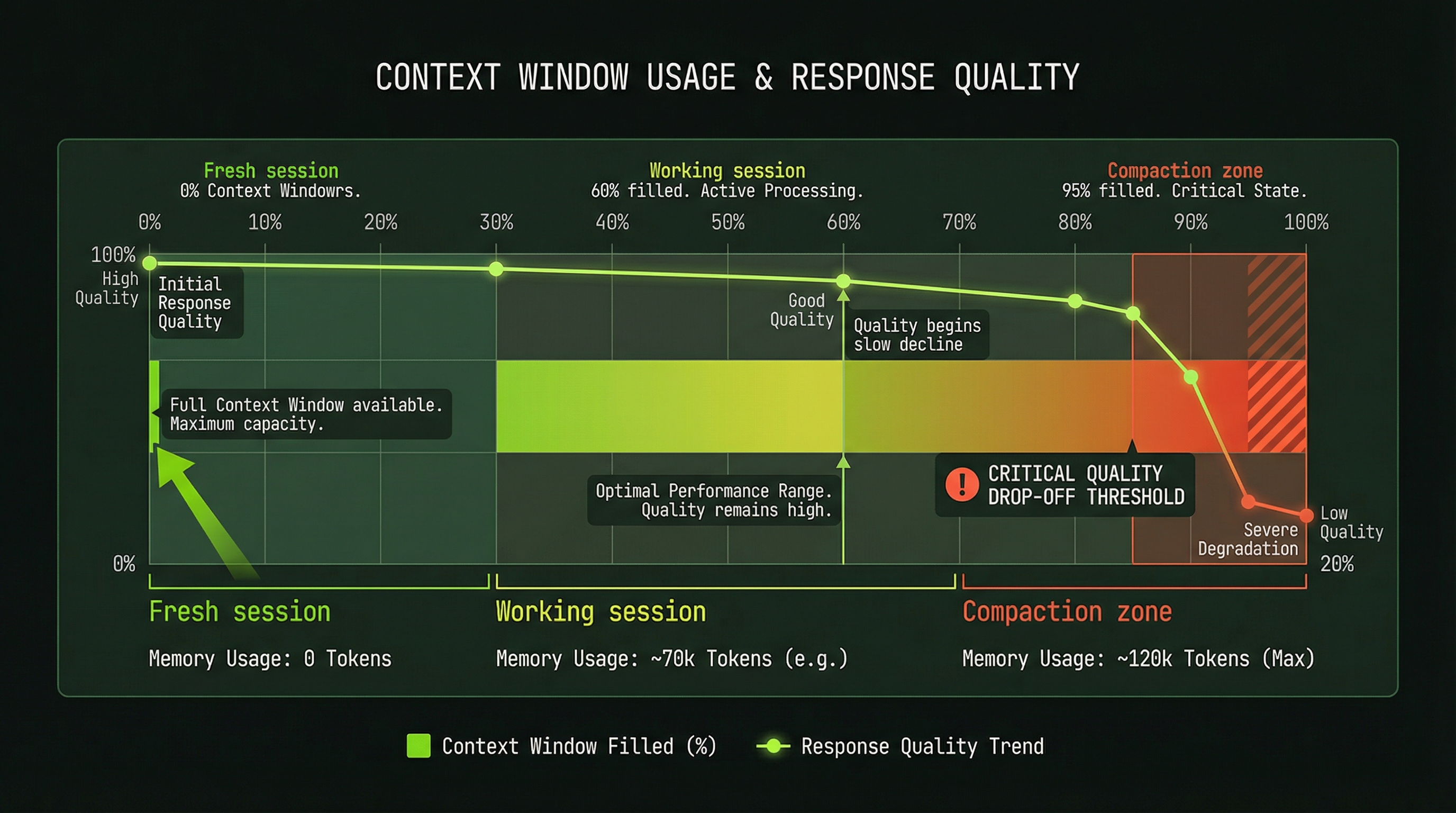
Every Claude Code session runs inside a context window. Everything the agent reads, every tool call it makes, every response it generates — all of it accumulates inside that window. The window is finite. And as it fills, things get worse in a specific and predictable way.
The agent doesn't suddenly forget everything at once. It degrades. Early decisions start to carry less weight. Connections between distant parts of the codebase become fuzzy. The agent starts referencing the schema it read 40 minutes ago with less precision than it referenced the file it read 2 minutes ago. Then, around 95% capacity, auto-compact kicks in — the session summarizes its history to free space. Useful, but lossy.
This is like trying to write a novel with a whiteboard that can only hold 20 sentences. You keep erasing the beginning to make room for the end.
The context window isn't a bug in the system. It's a hard architectural reality that shapes every decision about how you use Claude Code at scale. Once you internalize it, multi-agent architecture stops being "advanced" and starts being obvious.
Exercise: See It For Yourself
Before moving on, try this. Open Claude Code — not inside tmux yet, just a normal session. Ask it to read 10 files in a project you know well, one at a time. After each file, ask it to recall a specific detail from the first file you had it read.
Watch what happens. The first few recalls will be accurate. By file 7 or 8, the precision will have dropped. You won't need to hit the compaction limit for the degradation to be visible — the recall will start hedging, paraphrasing, or occasionally confusing details.
That's not a fluke. That's the fundamental problem this course is about solving.
Four Failure Modes of Single-Agent Work
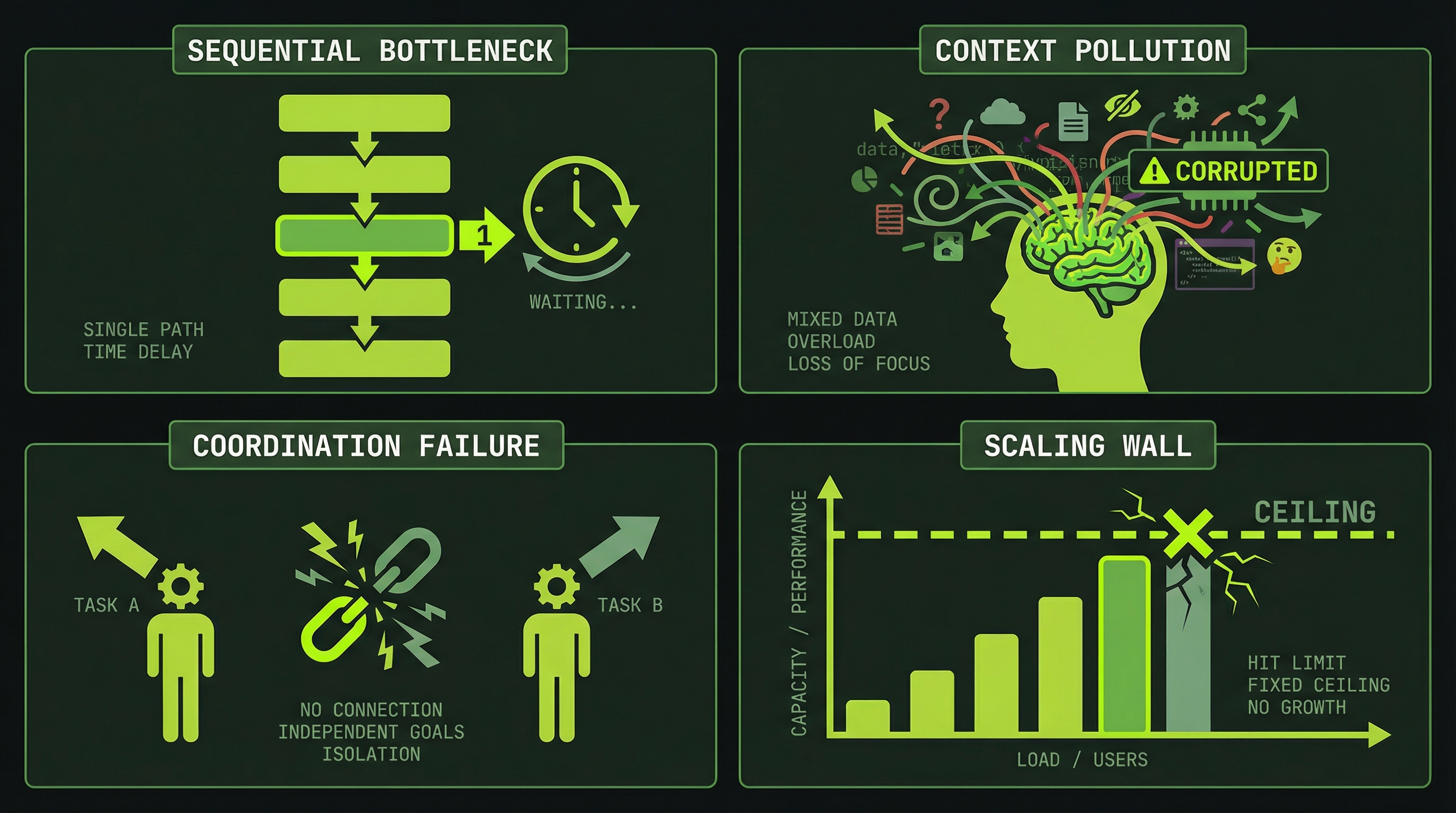
The context window is the root cause. We organize its effects into four failure patterns — a framework we use throughout this course to identify when you need multi-agent architecture. These aren't official Anthropic categories, but they map to real problems you'll encounter:
What Single Agents Do Well
Being clear-eyed about the failure modes doesn't mean single agents are the wrong tool. They're the right tool in a significant majority of cases.
- Focused, single-file tasks — Refactoring one component, fixing a specific bug, adding a field to a form. The task fits in one context and doesn't require parallel execution.
- Research and exploration — Reading through a codebase to understand its structure, investigating a library, generating a summary of options. Sequential by nature, and benefits from one continuous thread of reasoning.
- Isolated bug fixes — When the scope of a fix is well-defined and contained, a single agent with full context on that area is the cleanest solution.
- Quick scripts and utilities — Generating a migration script, writing a one-off data transformation, building a small CLI tool.
If the task fits in one context and doesn't need coordination, a single agent is simpler and cheaper. Don't reach for a team when you don't need one. The goal is judgment, not maximalism.
The Coordination Spectrum
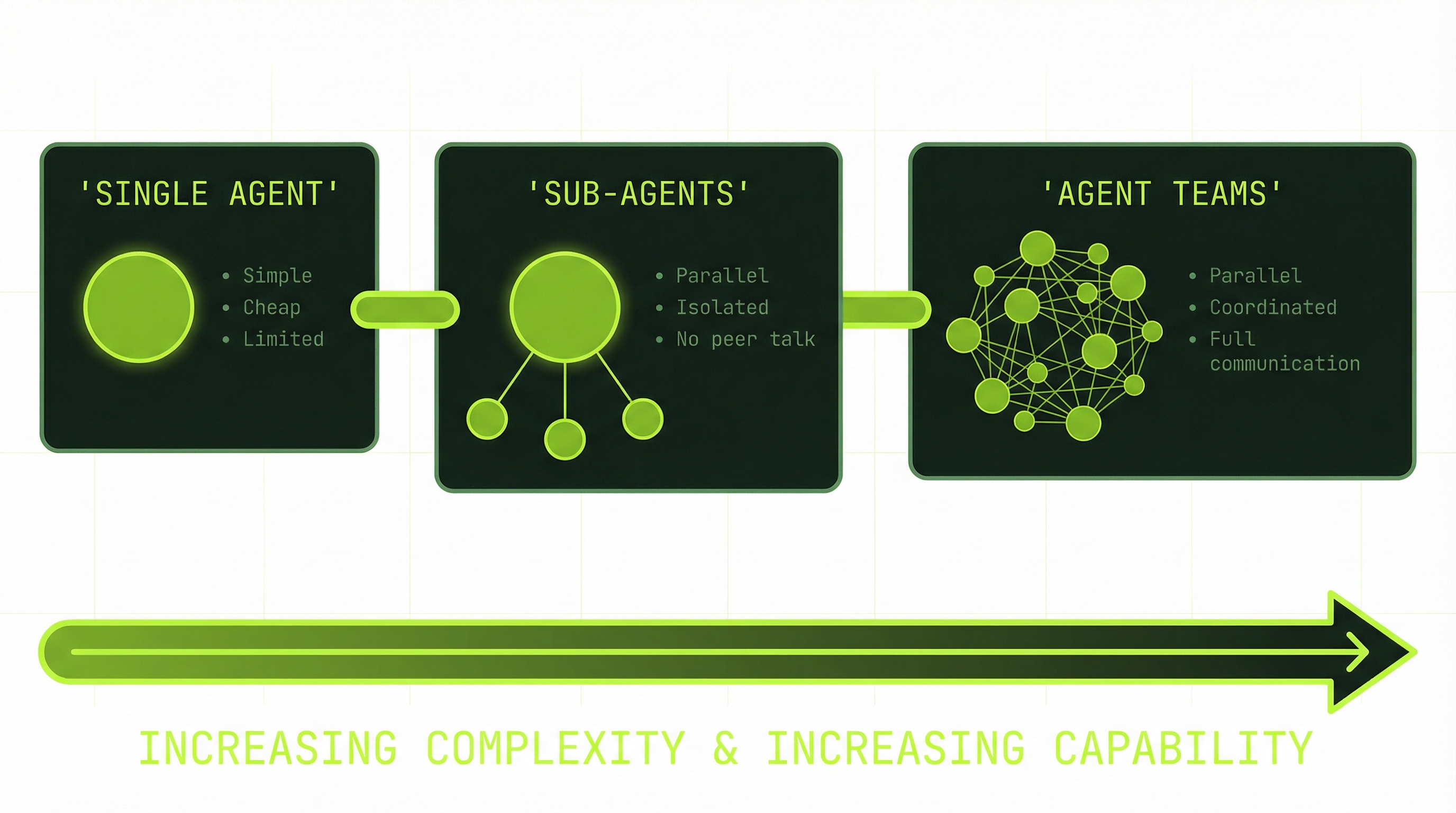
Every task you bring to Claude Code sits somewhere on a spectrum of coordination need. Learning to read where a task falls on that spectrum is the core skill this module is building toward.
This spectrum is the core architectural decision you'll make for every non-trivial task. Module 8 goes deep on the tradeoffs between isolated and full coordination. For now, the important thing is recognizing that the spectrum exists and that you have a choice at each point.
Connect Back to tmux
Remember those four panes you built in the last module? Each one is a viewport into a running process. That's exactly the structure you'll use for agent teams.
The lead agent lives in your original pane — the orchestrator. It receives your request, creates the task list, and coordinates at a high level. Each teammate gets its own pane: a database agent, a backend agent, a frontend agent. Each one owns a domain, runs in an isolated context, and communicates through the shared task list and messaging system.
You — watching from tmux — can scroll any agent's history to see what it decided and why. You can switch to any pane and talk directly to any agent. You can watch the task list update in real time as work is claimed and completed.
The panes aren't decoration. They're the observation layer that makes coordination legible to a human.
In the next module, you'll enable agent teams and configure your environment. In Module 5, you'll run your first team across those panes.
The Scale of What's Possible
To close out the theory: the ceiling on multi-agent work is not the model. The model is capable of far more than any single context window can express. The ceiling is your ability to orchestrate.
Anthropic's own research team ran a 16-agent system to reproduce a C compiler — a project spanning hundreds of thousands of lines, with agents specialized for parsing, code generation, optimization, and testing, all coordinated over days of execution. The cost was around $20,000. The alternative would have been months of human engineering time.
At a smaller scale: agent teams building full-stack features in minutes where a single agent would take an hour. Code review pipelines running security analysis, quality checks, and test coverage agents in parallel, each reporting to a synthesis agent that produces a unified review. Refactoring campaigns where a planning agent creates a task list and 6 execution agents work through it simultaneously.
None of that requires anything beyond what you already have: Claude Code, tmux, and a clear understanding of when coordination is worth the overhead.