Your First Agent Team
Enable agent teams, spawn your first collaborative team, and watch agents work in parallel
What you'll learn
Enable Agent Teams (2 Minutes)
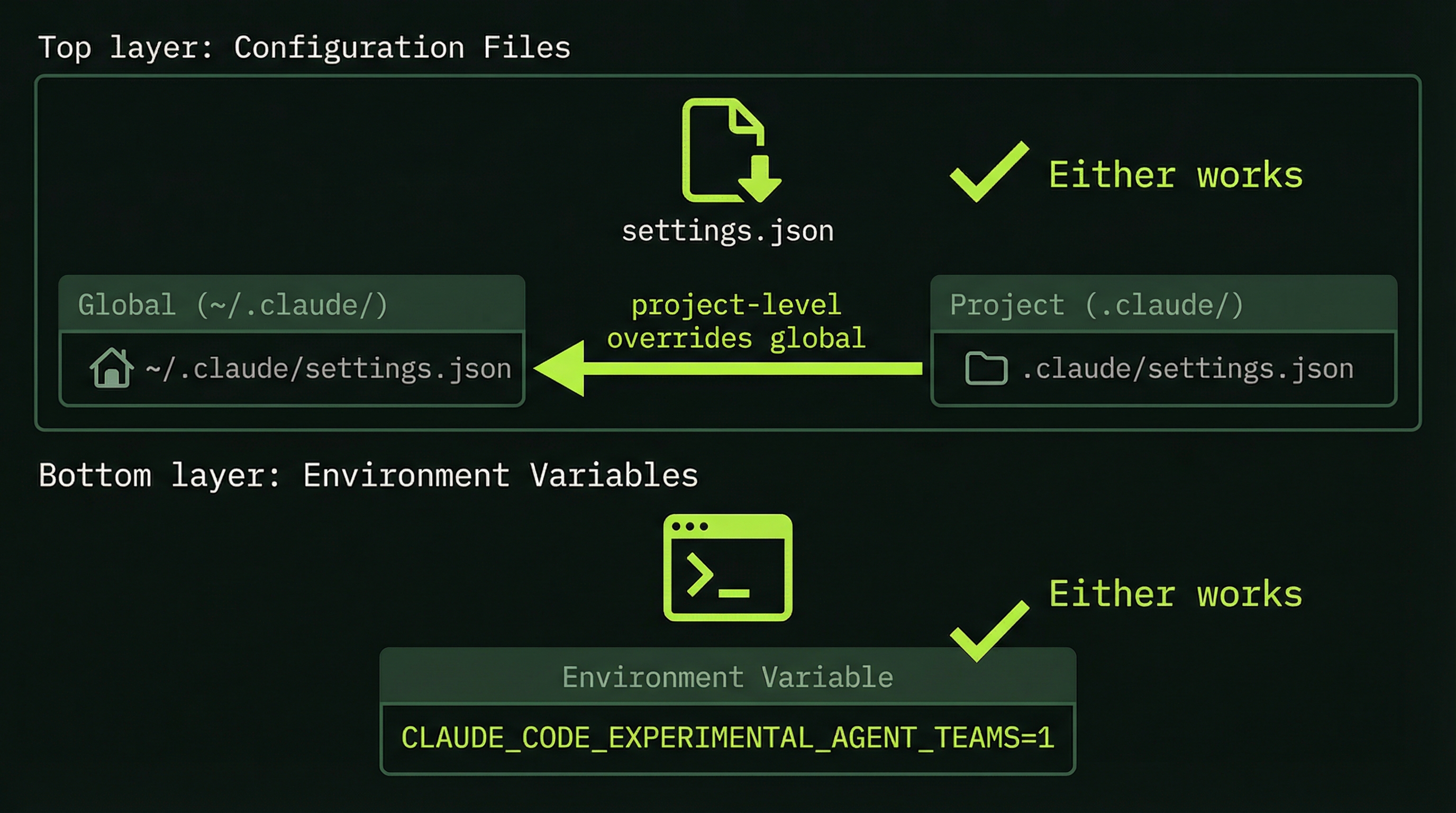
Before you can run your first team, you need to flip one switch. Agent Teams is still experimental, so it's off by default.
Option A: Environment Variable
Add this to your shell profile (~/.zshrc or ~/.bashrc) so it persists:
export CLAUDE_CODE_EXPERIMENTAL_AGENT_TEAMS=1Option B: settings.json (via env)
Add the environment variable through your Claude Code settings (global or project-level):
{
  "env": {
    "CLAUDE_CODE_EXPERIMENTAL_AGENT_TEAMS": "1"
  }
}Project-level settings (.claude/settings.json) override global settings. Use the env key in settings.json to set the environment variable per-project.
Verify It's Working
Start Claude Code inside tmux (you set this up in Module 2). If agent teams is enabled, you'll see it reflected when you ask Claude to create a team. No error about experimental features = you're good.
# Start tmux session
tmux new -s my-project

# Launch Claude Code inside tmux
claude
That's it. You're ready to spawn your first team.
Crafting the Request That Spawns a Team
Agent Teams are triggered by natural language — you describe the task and tell Claude you want a team. Claude decides whether to spawn teammates based on the task complexity. There's no magic keyword; clarity about what you want matters more than specific phrasing.
Phrases that tend to work well include:
Create an agent team to...Build a team to...Spawn teammates to...I want multiple agents working on...
Beyond the trigger phrase, the quality of your team depends heavily on how clearly you describe the roles and the coordination expectation. Compare these two prompts:
Weak: "Create an agent team to review my code."
Strong: "Create an agent team to review my codebase. I want one agent focused on security vulnerabilities (SQL injection, XSS, auth issues), one focused on code quality and style consistency, and one focused on test coverage gaps. Have them coordinate their findings and provide a unified review with prioritized recommendations."
The strong version gives the lead agent enough information to create meaningful role differentiation. It specifies what each specialist should focus on and what the output format should be. The lead will use this to generate unique context prompts for each teammate.
A Ready-to-Run First Team: Code Review
Code review is the ideal first team task because it's read-only (no risk of breaking changes), it naturally decomposes into specialist roles, and the output is easy to evaluate. Here is a complete prompt you can use verbatim:
Create a code review agent team for this codebase.

I want:
- One agent focused on security issues (auth, injection,
  data exposure, dependency vulnerabilities)
- One agent focused on code quality and style (naming,
  complexity, DRY violations, type safety)
- One agent focused on test coverage (untested paths,
  missing edge cases, test quality)

Have them coordinate their findings and provide a combined
review with prioritized action items.
Paste this into your Claude Code session (while running inside tmux with Agent Teams enabled). Then watch what happens.
The Four Phases of a Team Run
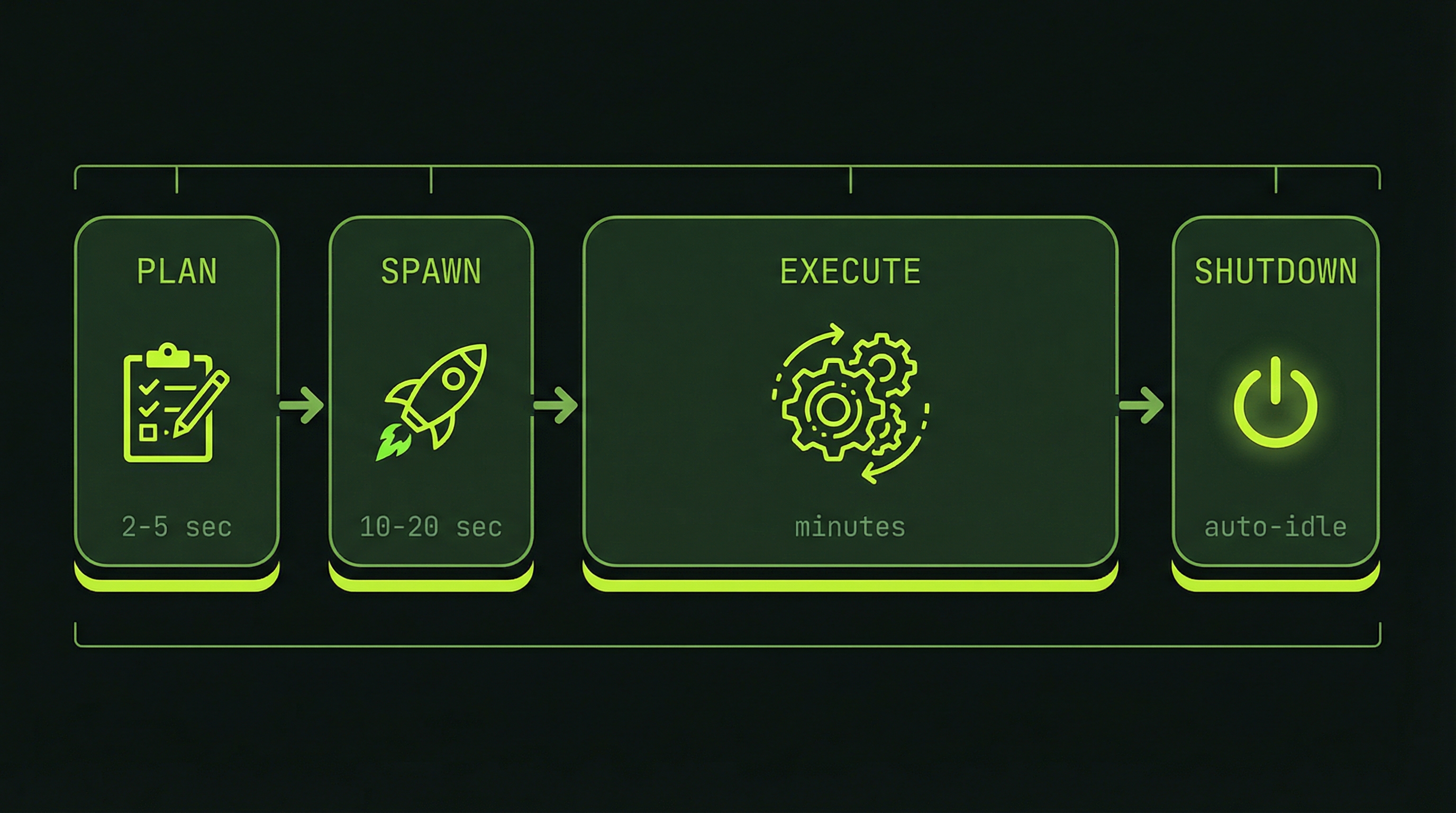
We break a team run into four phases to help you understand what's happening at each stage. This is our framework for observing the lifecycle — knowing what to expect prevents you from misreading normal behavior as a problem.
Planning
2–5 sec
Spawning
10–20 sec
Execution
minutes
Shutdown
5 min idle
Reading the tmux Panes While Running
With a three-agent code review team running in split-pane mode, you'll typically see four panes: the lead on the left, and the three specialists split on the right. Here's what to look for in each.
Team Lead Pane
The lead pane shows the orchestration layer. Look for:
- Task list creation — "Creating task list: [SecurityReview, QualityReview, CoverageReview]"
- Spawn confirmations — "Spawning SecurityReviewer..." followed by "SecurityReviewer online"
- Incoming messages — "Message from SecurityReviewer: Found SQL injection risk in auth/login.ts line 47"
- Status queries — You can ask the lead "What's the team status?" at any time and it will summarize active tasks
Teammate Panes
Each teammate pane shows that agent's independent work stream. Look for:
- Role identification — The pane title and first output lines confirm which specialist this is
- Task claim — "Claiming Task #1: Review authentication module for security vulnerabilities"
- Active tool use — File reads, grep searches, bash commands — all the typical Claude Code tool output
- SendMessage events — When an agent communicates with the lead or a peer, you'll see "SendMessage:" in the output
- Context percentage — Watch the status line. If an agent hits 85%+, it's near its limit and may start summarizing earlier work
Checking Team Status Mid-Run
You can interact with the lead agent while the team is running. The most useful queries:
# Navigate to the lead pane
Ctrl+B, then arrow key to lead pane

# Ask the lead for a status update
"What is the current status of each agent?"

# Ask about a specific agent
"What has SecurityReviewer found so far?"

# Ask about remaining work
"Which tasks are still in progress?"
Understanding Task Completion Signals
How do you know when the team is done? There are several signals to watch for:
- Teammate panes begin disappearing — As agents complete their tasks and enter idle state, their panes close. This is normal and expected, not an error.
- The lead produces a synthesis — After all teammates report in, the lead begins constructing the final combined output. This is typically the longest single output block in the session.
- Task list shows all items complete — If you query the lead with "show me the task list status," all items should show as complete.
For a simple three-agent code review on a medium-sized codebase, expect the full run — from "Create a team" to final synthesis — to take between 5 and 15 minutes depending on codebase size and API response times.
The Two Coordination Patterns You'll See
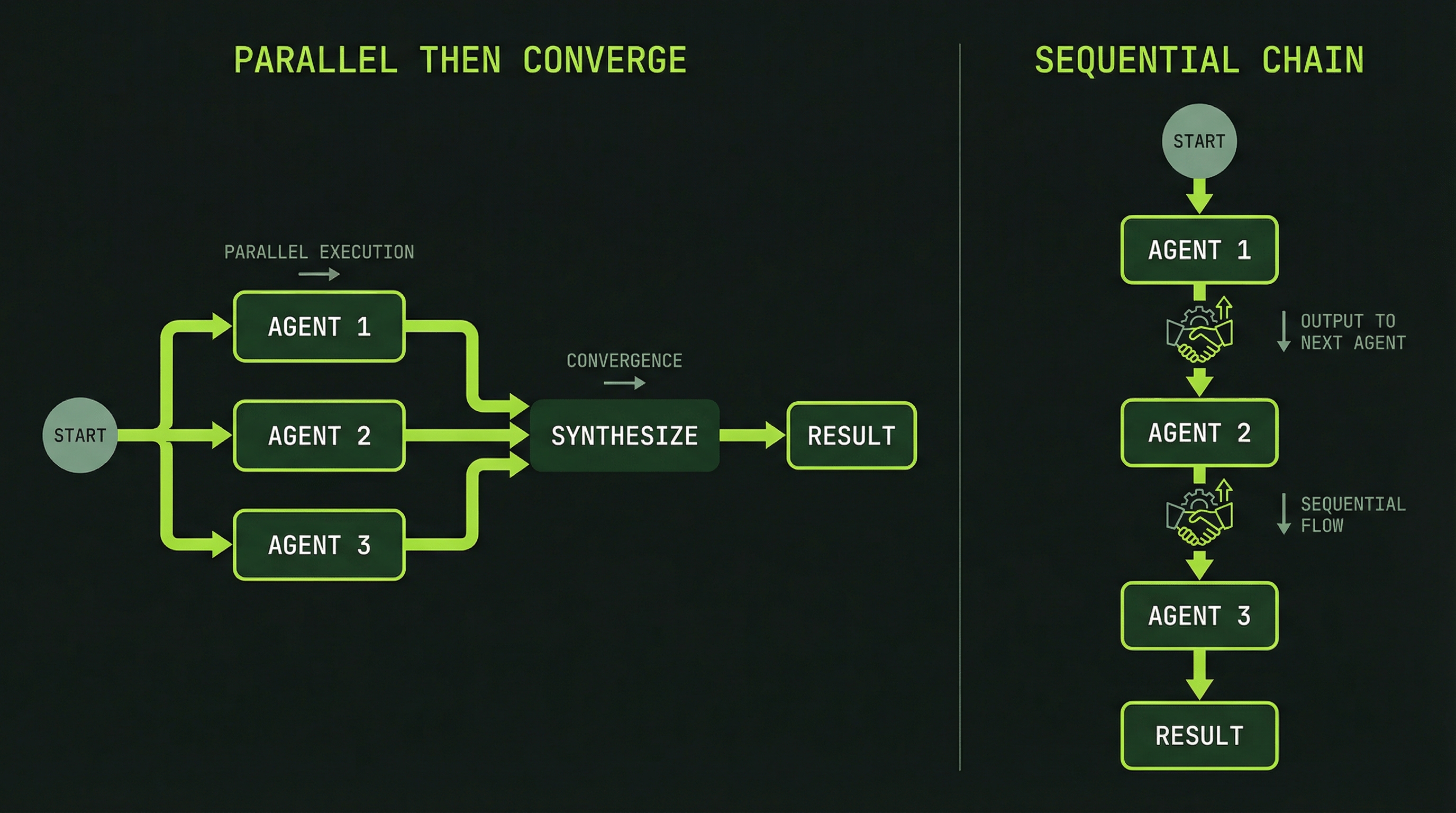
Your first team will likely exhibit one of two coordination patterns. Recognizing them helps you understand whether the team is behaving correctly.
Pattern 1: Parallel-then-Converge
Each specialist works independently through their tasks, then reports findings to the lead. The lead synthesizes all reports into a single output. This pattern looks like:
SecurityReviewer ──[finds issues]──→ SendMessage → Lead
QualityReviewer  ──[finds issues]──→ SendMessage → Lead
CoverageReviewer ──[finds issues]──→ SendMessage → Lead
                                    Lead synthesizes
                                    → Final report
This is the most common pattern for review tasks. Agents work in parallel with minimal inter-agent communication, then converge at the lead for synthesis.
Pattern 2: Sequential Dependency Chain
When tasks have dependencies — one agent's output is required input for another — you'll see a handoff pattern:
DatabaseAgent ──[schema complete]──→ SendMessage ──→ BackendAgent
                                                       [uses schema]
                                                           ↓
                                                       FrontendAgent
                                                       [uses API contract]
In this pattern, some agents start, complete their work, and send a message to unblock the next agent. You'll see some panes appear active while others wait. This is intentional — it reflects real-world dependencies between work that cannot be fully parallelized.
Performance Metrics: What to Expect
The 3–4x token multiplier is the key cost consideration. A task that costs $0.50 as a single agent will cost approximately $1.50–$2.00 as a three-agent team. The return on this investment is speed, quality through specialization, and the ability to complete work that would fail in a single context. Whether the multiplier is worth it depends on the task — Module 11 covers cost optimization in detail.
Diagnosing the Three Common First-Team Problems
Problem: Agents Not Communicating
You're watching the panes and see agents working, but no SendMessage events appear in any pane's output. The agents seem to be working in isolation.
Diagnosis: Use scroll mode (Ctrl+B [) to scroll up through each agent's history and search for "SendMessage" or "message." If there are truly no messages, the task structure may not have created enough interdependency to require communication. For review tasks, this is sometimes correct — agents work independently and report to the lead at the end.
If you expect communication but see none, ask the lead directly: "Are your teammates communicating with each other? Have you received any messages from them?"
Problem: One Agent Far Ahead of Others
One specialist pane is showing lots of activity and has completed its task, while the other two panes appear largely idle or are progressing slowly.
Diagnosis: This is often normal. Task complexity varies by domain — a security review might finish in 3 minutes while a test coverage analysis takes 8 minutes. Before concluding something is wrong, use scroll mode to verify the slower agents are actually making progress, not stalled.
If an agent genuinely appears stuck (no new output for several minutes), navigate to that pane and ask it directly: "What are you currently working on? Can you continue?"
Problem: Agents Stuck in Idle
One or more agents spawned, showed initial activity, then went quiet without completing their tasks.
Diagnosis: Check whether the stuck agent is waiting on a dependency from another agent. Navigate to the stuck pane, enter scroll mode, and look for messages like "Waiting for task #1 to complete" or "Dependencies not yet satisfied."
If it's a genuine stall rather than a dependency wait, you can message the agent from the lead pane: "Agent [name], what is blocking your progress? Please provide a status update and continue working."
If the agent auto-terminates from idle timeout before completing, you can ask the lead to reassign its tasks: "SecurityReviewer stopped before completing. Please take its remaining tasks and finish them yourself."
After your first team completes, take 10 minutes to scroll back through each pane's history. Read the task claims, the messages between agents, and the final synthesis. This retrospective builds the intuition for reading team behavior that you'll use in all future runs. The agents leave a complete audit trail — use it to understand how coordination actually worked in practice.
Congratulations — you've now run your first Agent Team. The next module dives into the task system and communication layer in depth: how tasks are structured, how agents claim and coordinate work, and how the messaging protocol enables genuine collaboration rather than just parallel execution.
SendMessage event in the agent output, indicating real inter-agent communication