Team Lifecycle Management
Creating, monitoring, and gracefully shutting down agent teams
What you'll learn
The Team Creation Lifecycle
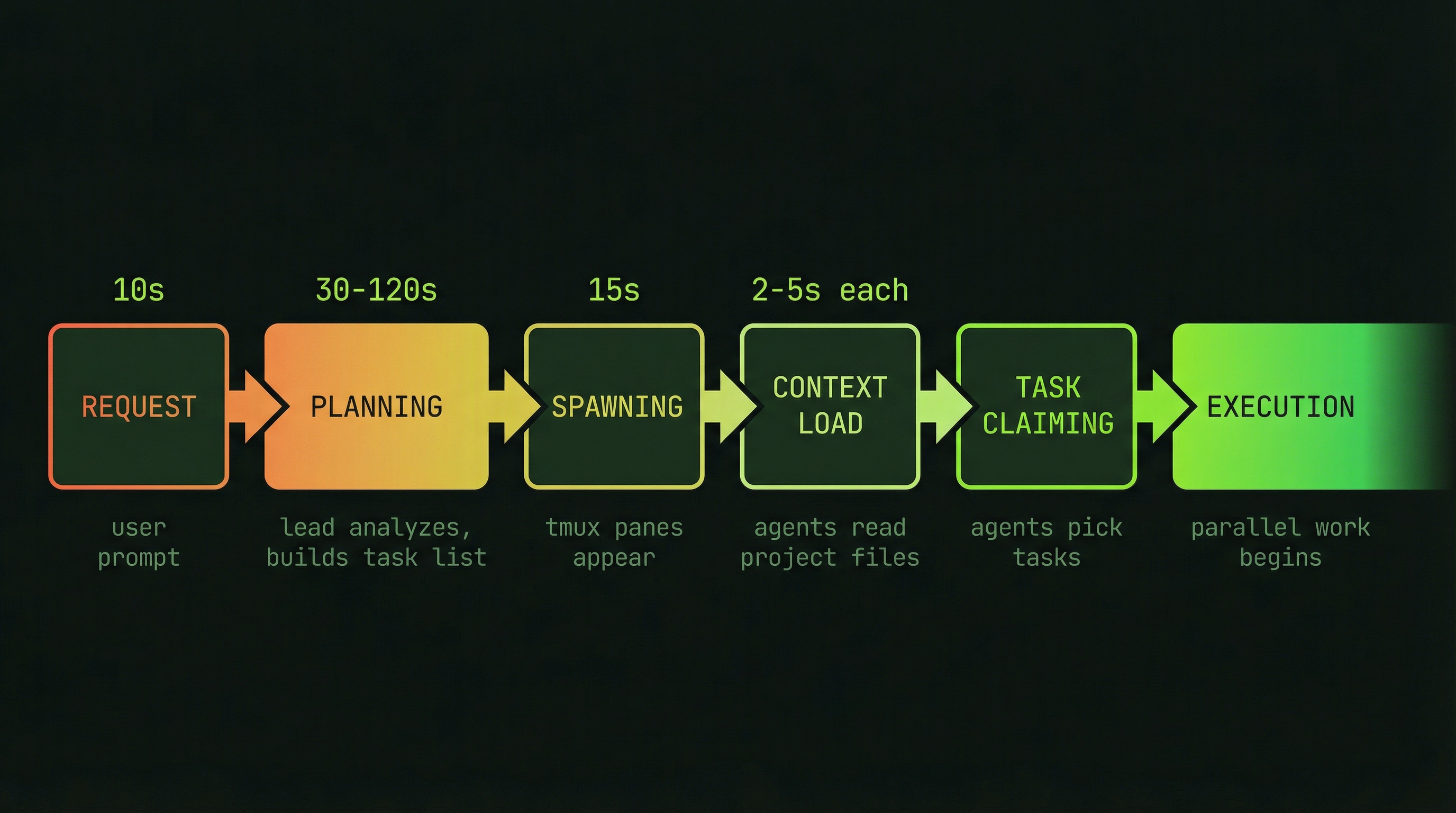
Spawning a team is not instantaneous — it follows a structured sequence that takes anywhere from a few seconds to a couple of minutes depending on team size. Understanding each phase helps you know what is happening in those first moments after you send your request, and it helps you recognize when something has gone wrong during initialization.
Request (from you)
  ↓
Lead Agent Plans Team (~30–120 seconds)
  ↓
Teammates Spawned (appear as new tmux panes)
  ↓
Teammates Load Context (2–5 seconds per teammate)
  ↓
Lead Creates Task List
  ↓
Teammates Claim Tasks
  ↓
EXECUTION (parallel work begins)
The planning phase is where the lead reads your codebase, identifies the work that needs to be done, decides how many agents are appropriate, and writes out the initial task list. This phase runs entirely in the lead's context window before any teammates exist. Investing time here pays dividends throughout the session — a lead that plans carefully produces well-scoped tasks and avoids mid-execution confusion.
Once the lead has a plan, it spawns each teammate as a separate tmux pane. Each pane loads the teammate's initial context: its role, its assigned tasks, its permissions, and any shared knowledge the lead determined it needs. This context-loading phase is brief but visible — you can watch each pane come alive in your tmux window.
Understanding Agent Idle States
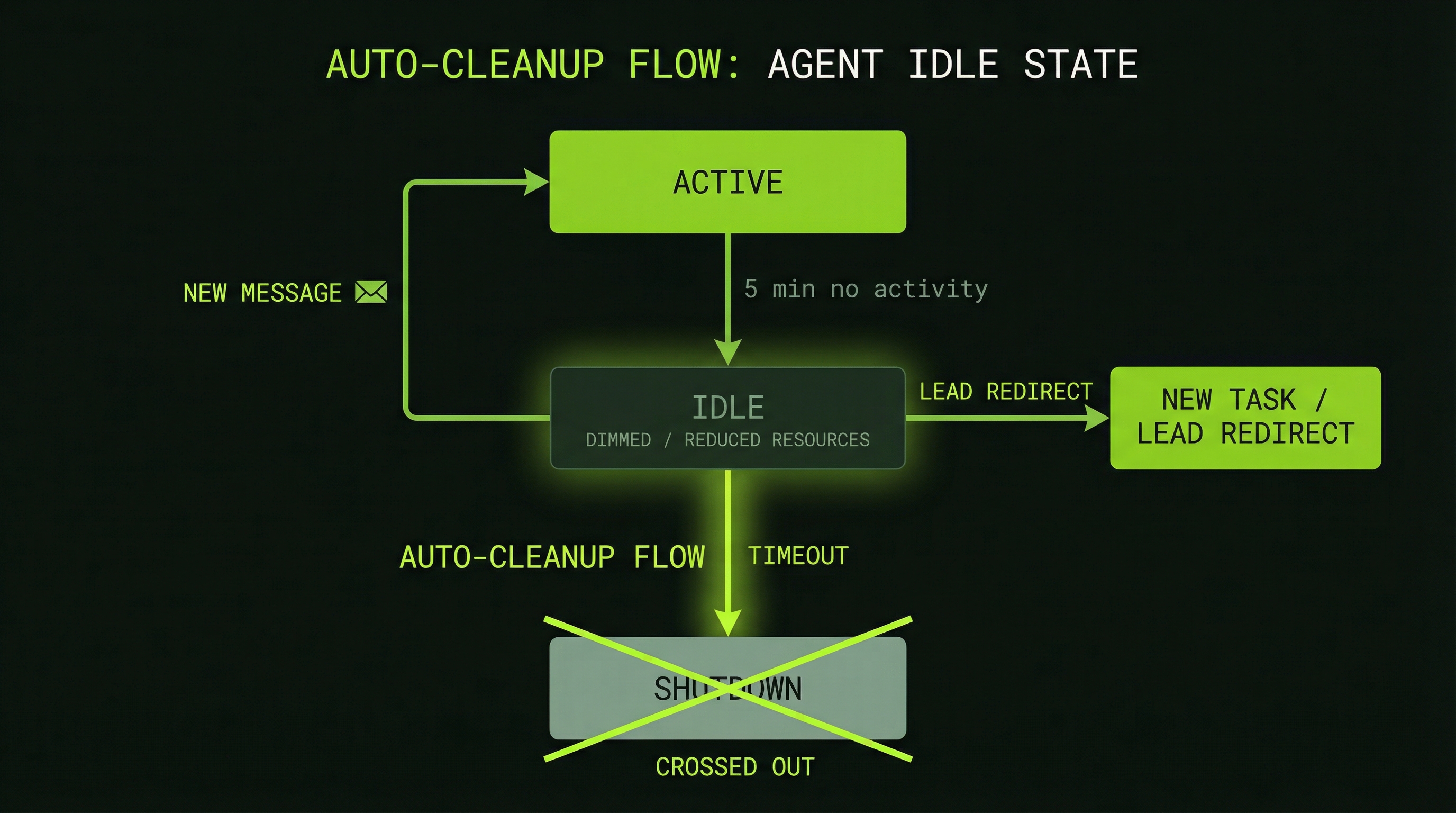
Agents become idle for three reasons: they have finished all their assigned tasks, they are blocked waiting for a dependency to clear, or the lead has explicitly paused them. An idle agent is still alive — it occupies a tmux pane and can respond to messages — but it is not consuming tokens while it waits.
Idle Agent (visible in tmux, waiting)
   ↓ (no new work assigned within ~5 minutes)
Auto-termination triggered
   ↓
Agent pane closes
   ↓
Lead notified agent is offline
The auto-termination timer is a cost-control mechanism. An agent that sits idle indefinitely costs nothing in tokens, but it does occupy resources and can become a source of confusion if you later try to assign it work it is no longer equipped to handle (its context may have aged out of relevance). Auto-termination keeps the team lean.
Waking and Redirecting Idle Agents
Before an idle agent auto-terminates, you — or the lead — can reassign it. This is often the right move when new tasks emerge mid-session or when one agent finishes early and another is overloaded. The mechanism is simply a direct message:
# Wake and assign new work
"BackendAgent, the API rate limiting task just became unblocked.
 Please pick it up — the spec is in tasks.json under task-7."

# Ask an idle agent for review work
"DatabaseAgent, you're idle. Can you review BackendAgent's
 migration script for correctness before we run it?"
The idle agent reads the message, re-engages its context, and begins working. There is a brief warm-up period as it re-orients itself, but it is far cheaper than spawning a brand-new agent with full initialization overhead.
Explicit Lifecycle Controls
Beyond letting the system manage agent lifecycles automatically, you have direct control through the lead agent. These commands let you orchestrate the team in real time:
# Assign a batch of work to one agent
"FrontendAgent, work on tasks 3, 4, and 5 in order."

# Gracefully shut down a specific agent
"Shut down BackendAgent — we've finished all backend work.
 Summarize what you completed before closing."

# Pause all agents (e.g., to discuss architecture)
"All teammates, pause work until I say resume."

# Resume after a pause
"All teammates, resume your current tasks."

# Get a full team status snapshot
"Show me each teammate's current task, context usage,
 elapsed time, and any blockers they've encountered."
The pause-and-resume pattern is underused but powerful. If you spot a mistake mid-execution — an architectural decision that will cascade through multiple agents' work — pausing the team immediately prevents compounding the error. You can discuss the correction with the lead, update the relevant task descriptions, and resume with everyone aligned on the corrected approach.
Team Lifecycle Management Tools
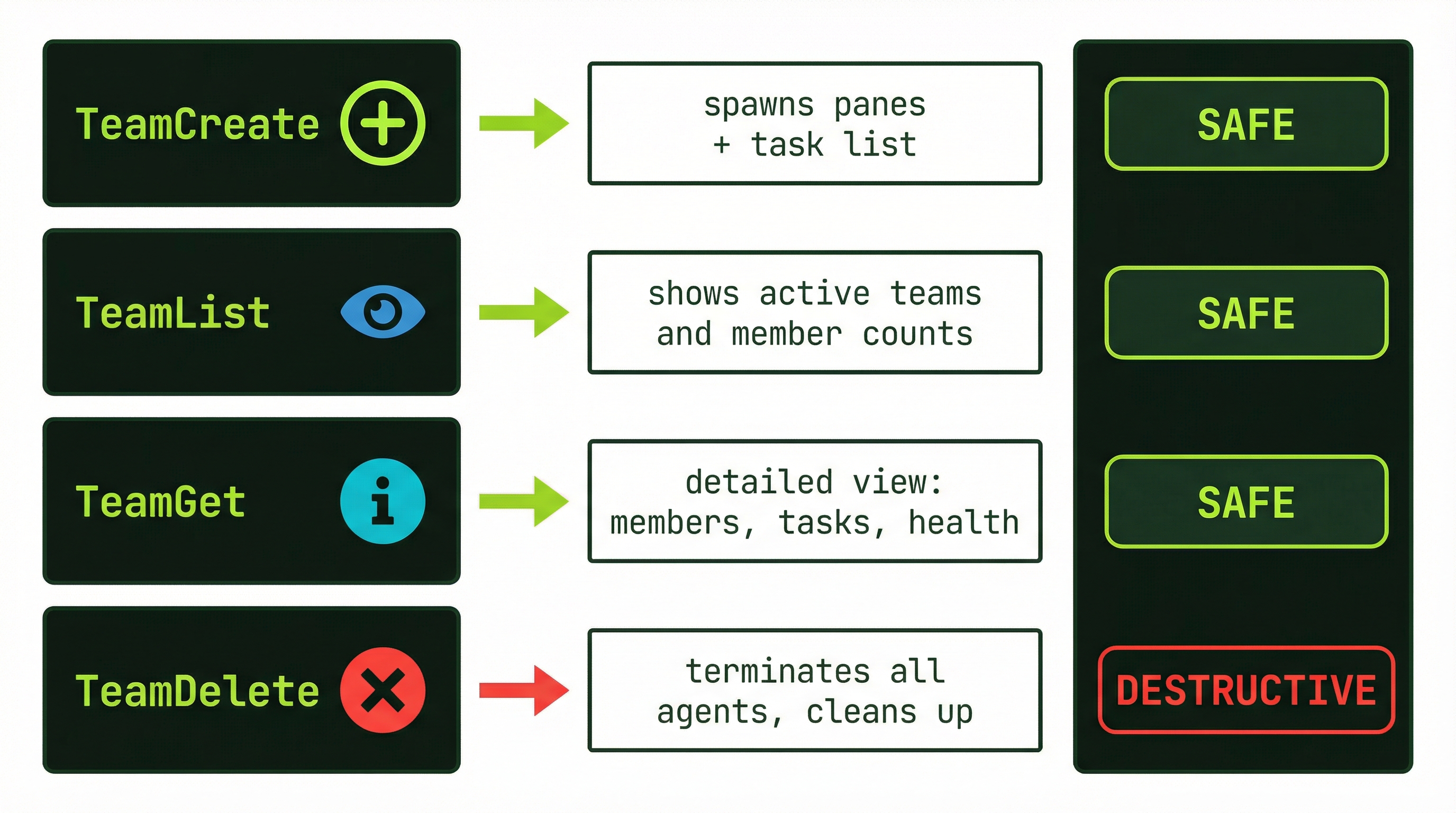
The multi-agent system exposes three core tools for managing teams as first-class entities. These operate at the team level rather than the individual agent level:
# Create a named team
TeamCreate → { team_name: "payment-feature", description: "..." }
  returns: team ID, config, initial state

# Inspect active teams
TeamList → shows all active teams, member count, aggregate status
TeamGet  → detailed view of one team: members, tasks, health

# Remove a team
TeamDelete → terminates all agents, cleans up task files, removes team
TeamDelete is a hard termination — it does not wait for in-progress tasks to finish. Use it when you need to abort a session that has gone sideways, or after a clean natural shutdown when you want to explicitly reclaim resources. For normal end-of-work scenarios, prefer the graceful shutdown options described below.
Graceful Shutdown Strategies
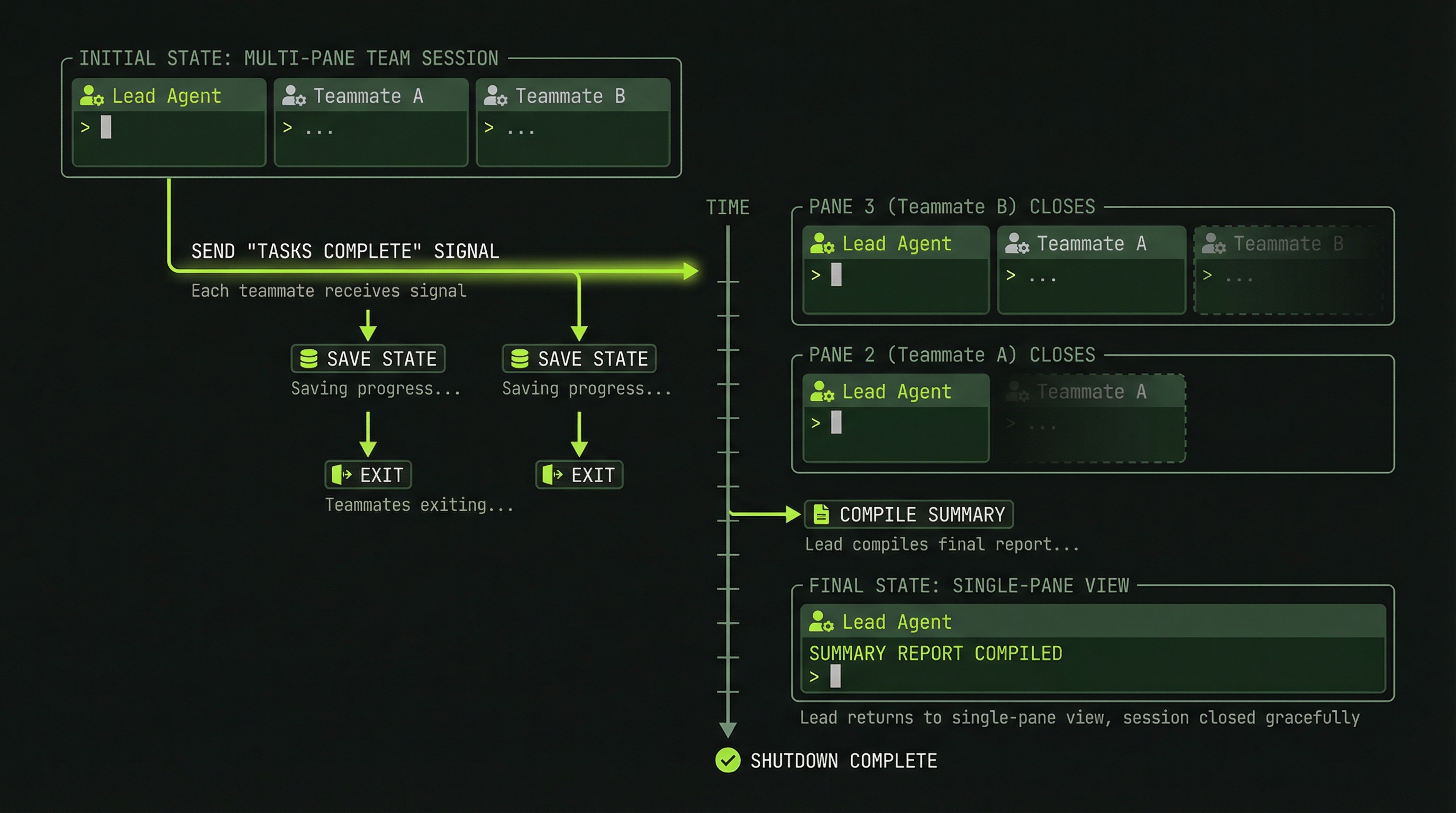
How you end a team session matters. An abrupt shutdown loses the synthesis work that should happen at the end — the lead combining agent outputs, writing a summary of what was accomplished, and noting anything that remains. There are two graceful approaches.
Option 1: Natural Shutdown (Recommended)
When all tasks are marked complete and no new work is assigned, the team winds down naturally without any intervention from you:
All tasks marked complete
  ↓
Agents finish their current work items
  ↓
Agents transition to idle state
  ↓
Auto-terminate after timeout (~5 minutes)
  ↓
Lead performs synthesis (while teammates wind down)
  ↓
Team fully shut down
The advantage of natural shutdown is that nothing falls through the cracks. Each agent completes its work before going idle, and the lead has time to synthesize results while the team is still technically alive in case a question arises.
Option 2: Lead-Initiated Shutdown
When you want to end the session on your schedule — perhaps because time is short or you have what you need — tell the lead to initiate a controlled shutdown:
"All teammates, we're done with this session.
 Before shutting down:
   1. Write a brief summary of what you completed
   2. Note any unfinished items or known issues
   3. Push any uncommitted work
 Then shut down gracefully."
Each teammate responds with its summary, the lead collects them into a consolidated report, and then the orchestrator closes the panes. This leaves you with a clean record of the session even if not every task reached completion.
Monitoring Team Health
A healthy team looks like this: agents are actively claiming tasks, context usage is growing at a steady rate proportional to the work being done, and the lead receives regular completion messages. When you stop seeing these signals, something may be wrong.
Warning signs to watch for:
- An agent hasn't claimed a task in 2+ minutes — it may be stuck, confused, or waiting on something it hasn't communicated
- Context usage far higher than expected — the agent may be stuck in a loop, reading large files repeatedly, or handling an unexpectedly complex problem
- The same task is being attempted multiple times — indicates a recurring failure the agent cannot self-resolve
- No inter-agent communication events — in a team that should be coordinating, silence is a red flag
When you spot a warning sign, act quickly. The longer an unhealthy agent runs, the more tokens it wastes and the more its divergent work complicates the overall integration:
# Step 1: Diagnose
"What's the current state of BackendAgent?
 What task is it on, what has it tried, and what's blocking it?"

# Step 2: Provide guidance
"BackendAgent, here's additional context: the database uses
 PostgreSQL 15, and the uuid-ossp extension is pre-installed.
 Try using gen_random_uuid() instead of uuid_generate_v4()."

# Step 3: If guidance doesn't help — reassign
"Reassign task-5 from BackendAgent to FrontendAgent.
 BackendAgent, move to task-8 instead."

# Step 4: Broadcast corrections to the whole team
"All teammates: the API base URL has changed to /api/v2.
 Update any hard-coded references in your current work."
Cost Management Across the Lifecycle
Token costs in a multi-agent session accumulate from two sources: the per-message API cost of each agent's context, and the overhead of team coordination (task reads and writes, inter-agent messages, status updates). Both are controllable if you manage the lifecycle deliberately.
Agent costs grow with every exchange in their context window. An agent at 80% context that keeps working doesn't just use 20% more capacity — it starts compacting earlier work, which can cause it to "forget" important context and make mistakes. Shut down high-context agents before they hit 90%.
Five practices that significantly reduce total session cost:
- Set a clear scope before spawning. "Keep working until you figure it out" is the most expensive instruction you can give. Define the outcome upfront.
- Start with 3–5 agents, not more. The coordination overhead of 8+ agents routinely exceeds the parallelism benefit. More agents means more inter-agent messages, more task conflicts, and more lead overhead.
- Monitor context percentages. An agent at 85%+ context is expensive to keep running. If its remaining tasks are minor, wrap them up quickly or hand them off to a fresh agent.
- Batch small tasks. Spawning a full team for a single 10-minute task is rarely worth the overhead. Use a single session or a sub-agent instead.
- Set implicit task timeouts. If a task isn't complete after 15–20 minutes, something is wrong. Surface it rather than letting the agent burn tokens indefinitely.
A Complete Lifecycle Example: Code Review Team
Putting all of this together, here is what a complete, well-managed team lifecycle looks like from request to shutdown:
1. REQUEST (you, ~10 seconds)
   "Create a code review team for commits SHA123..SHA456.
    Focus on security, performance, and test coverage."

2. PLANNING (lead only, ~2 minutes)
   - Lead reads the diffs: 8 files changed, 340 lines
   - Identifies 12 discrete review tasks
   - Plans 3 specialized reviewers

3. SPAWNING (15 seconds)
   - SecurityReviewer appears in pane 1
   - PerformanceReviewer appears in pane 2
   - CoverageReviewer appears in pane 3

4. EXECUTION (5–10 minutes, parallel)
   - Each reviewer works on 4 tasks simultaneously
   - Reviewers message each other when findings overlap
   - Lead monitors context usage (stays below 60%)

5. SYNTHESIS (2 minutes)
   - All 12 tasks marked complete
   - Lead collects findings from all three reviewers
   - Produces single consolidated review report
   - Agents transition to idle

6. SHUTDOWN (automatic, ~5 minutes after idle)
   - All panes close after timeout
   - Team folder cleaned up
   - Session cost: 15,000–50,000 tokens (~$0.30–1.00)
Notice that the entire review — which might take a senior engineer 90 minutes working alone — completes in 15–20 minutes of wall clock time. The cost is well under a dollar. That is the practical value of lifecycle management: not just spinning up agents, but orchestrating their full arc from planning through clean shutdown.