Task System & Communication
How agents coordinate through shared task lists and peer-to-peer messaging
What you'll learn
The Shared Task List Architecture
When a lead agent spawns a team, it does not just send instructions into the void. Every task, assignment, and status update is written to a structured directory on disk that all agents can read. This shared state is the backbone of agent coordination — it is what separates a true multi-agent team from a collection of independent processes that happen to run simultaneously.
The task directory lives under your home folder and is organized by team name:
~/.claude/tasks/{team-name}/
├── tasks.json          # All tasks, statuses, assignments
├── agent_{id}_1.json   # Individual agent state
├── agent_{id}_2.json
└── ...
The tasks.json file is the single source of truth. Any agent can read it at any time to see the full picture of what is done, what is in progress, and what is still waiting. Individual agent state files track each agent's context usage, elapsed time, and current assignment — information the lead uses to make scheduling decisions.
Task Lifecycle
Every task passes through a well-defined sequence of states. Understanding this lifecycle helps you anticipate where coordination might break down and how to intervene when it does.
pending (task created, waiting to be claimed)
   ↓
in_progress (teammate is actively working on it)
   ↓
completed (work finished)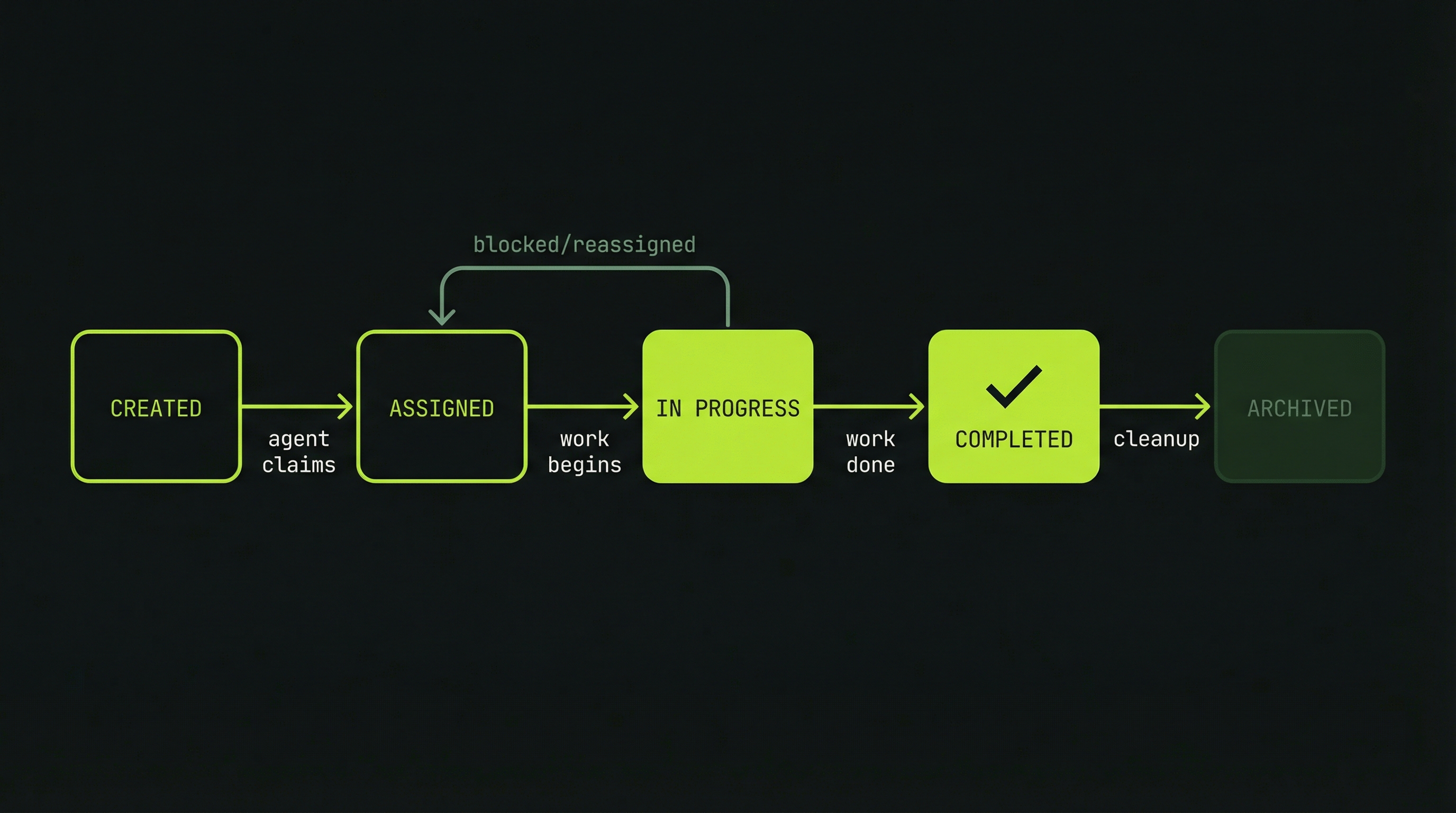
Claude Code's task system uses three states. A task starts as pending when created by the lead. It moves to in_progress when a teammate claims it and begins work. It becomes completed when the work is done. Tasks in a completed group are removed when the team finishes. The system is intentionally simple — the complexity lives in how agents coordinate around these states, not in the states themselves.
Anatomy of a Well-Formed Task
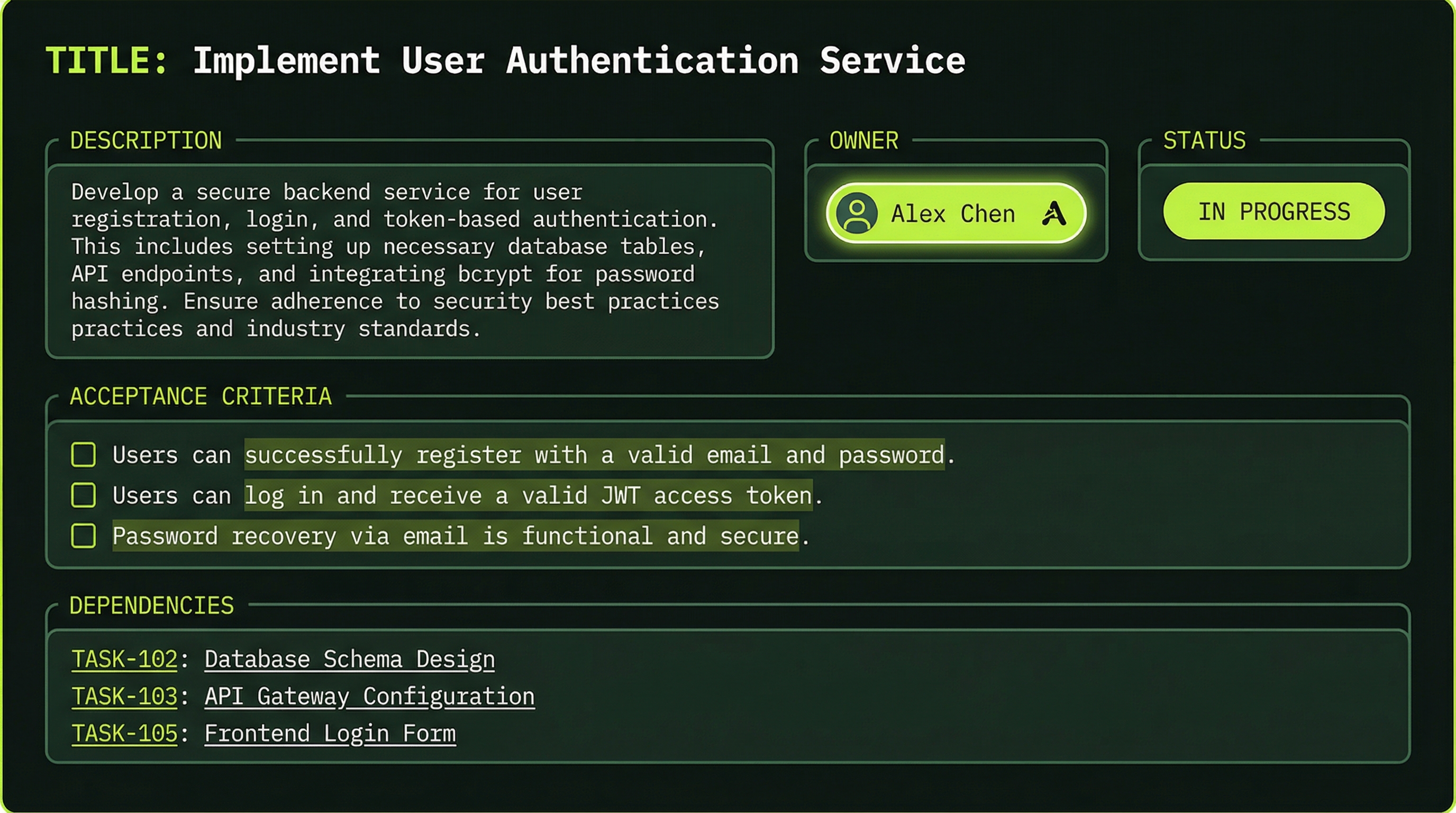
A task is more than a title. The full task object carries everything an agent needs to do its work without making assumptions or asking the lead for clarification:
{
  "id": "task-1",
  "title": "Implement payment webhook handler",
  "description": "Add ChargeB webhook endpoint to process purchase events",
  "status": "in-progress",
  "assignee": "backend-agent",
  "created_at": "2026-03-29T10:00:00Z",
  "completed_at": null,
  "dependencies": ["task-2"],
  "acceptance_criteria": [
    "Validates ChargeB HMAC signature on every request",
    "Deducts correct token count on successful purchase",
    "Handles idempotent webhook retries without double-charging"
  ]
}
The dependencies array is particularly important. Listing "task-2" as a dependency tells the system — and any agent reading the task list — that this task cannot begin until task-2 reaches Completed status. This prevents agents from starting work that will immediately be invalidated by upstream changes.
The JSON above is an illustrative example of how to think about task design, not the literal schema Claude Code stores on disk. Fields like acceptance_criteria and dependencies are best practices for what you include in the task description when creating tasks — they help agents understand what "done" means and what to wait for.
Good vs. Poor Task Design
The difference between a productive agent and a confused one often comes down to the quality of its task description. Compare these two:
Title: Implement authentication layer
Description: Add JWT token generation and validation using the existing src/auth/ module. Follow the pattern established in auth.service.ts.
Acceptance Criteria:
- POST /auth/login returns a signed JWT on valid credentials
- Protected endpoints return 401 on missing or expired token
- Token expiration is configurable via environment variable
Title: Build feature Description: Make it work
The poor task forces the agent to make dozens of decisions that should have been made by the lead during planning: Which feature? What does "work" mean? Are there edge cases to handle? Every unanswered question becomes a potential source of divergence from your intent.
Task Granularity Rule
Sizing tasks correctly is a skill. Too large and the agent becomes overwhelmed, makes sweeping assumptions, and the task becomes impossible to parallelize. Too small and the overhead of task management — reading the task list, writing status updates, sending completion messages — exceeds the value of the work itself.
The practical rule of thumb: one task should represent 5–30 minutes of focused work. That translates to one meaningful component — a single API endpoint, one database migration, one React component, one test suite for a specific module. When you find yourself writing a task like "implement the entire billing system," break it into its constituent parts.
Communication Patterns
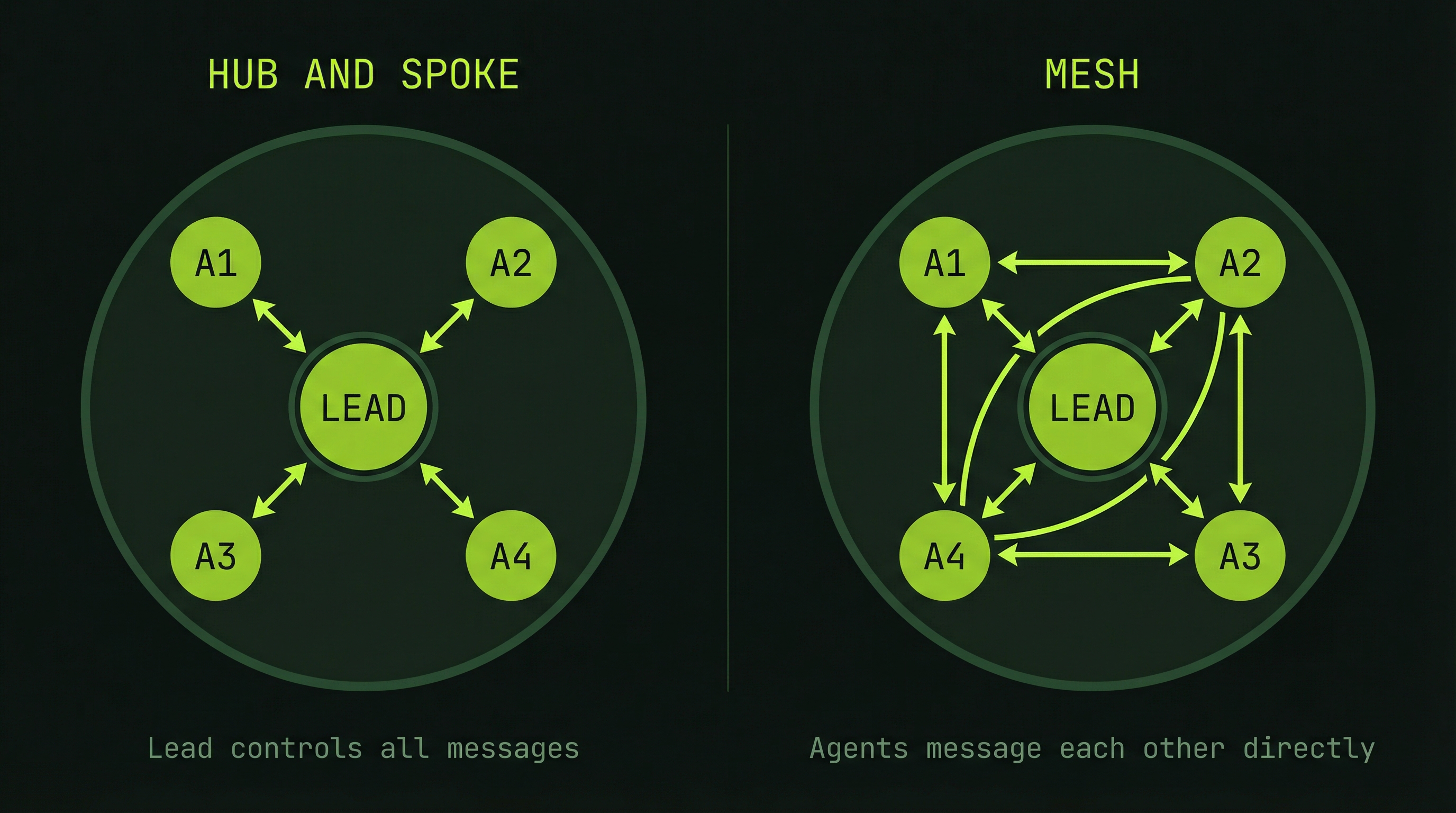
How agents talk to each other is as important as what they say. Agent Teams support two fundamentally different communication topologies, and choosing the right one affects both speed and reliability.
Pattern 1: Hub-and-Spoke (Through Lead)
In the hub-and-spoke model, all communication flows through the lead agent. A teammate never speaks directly to another teammate — it sends a message to the lead, which decides what to relay and when.
Teammate A → Lead → Teammate B
(traditional, serialized, controlled)
This pattern is predictable and easy to audit. The lead always has a complete picture of what every agent knows. The downside is latency: if BackendAgent discovers an API contract issue that FrontendAgent needs to know about immediately, that information has to bounce through the lead before it reaches the right recipient.
Pattern 2: Mesh (Direct Peer-to-Peer)
In the mesh model, agents communicate directly with each other. The lead still sets direction and monitors overall progress, but teammates can coordinate laterally without waiting for the lead to relay messages.
Teammate A ↔ Teammate B
         ↘   ↙
          Lead
This dramatically speeds up coordination when agents are working on tightly coupled components. Here is a concrete example of what a direct peer message looks like in practice:
From: BackendAgent → To: FrontendAgent

"API endpoint finalized and deployed to staging:

  POST /api/payment/process
  {
    "package_id": "STANDARD",
    "quantity": 1
  }

  Response:
  {
    "token_balance": 100,
    "status": "success" | "insufficient_funds" | "error"
  }

Ready for integration. I've also added a /api/payment/status
endpoint that returns the same shape — useful for your polling
logic. Let me know if the error codes need adjustment."
FrontendAgent receives this message immediately and can begin integration work without waiting for the lead to pass along the information. In a tightly coordinated build, this kind of direct communication can save many minutes of idle waiting time across an entire team session.
Monitoring Task Progress
The lead agent is responsible for maintaining visibility over the team's progress. A well-functioning lead should be able to answer at any moment: which tasks are done, which are in flight, which are blocked, and whether any agent is showing signs of trouble.
Prompting the lead to report current status produces a structured view:
TaskList:
├─ Task 1 (Database Schema)     [COMPLETED by db-agent]
├─ Task 2 (Payment API)         [IN PROGRESS by backend-agent]
├─ Task 3 (Billing Page UI)     [PENDING]
├─ Task 4 (Integration Tests)   [PENDING - blocked by Task 2]
└─ Task 5 (Documentation)       [PENDING]

In-Progress Details:
- backend-agent: 65% context used, 8 min elapsed, on track
- db-agent: idle, available for reassignment
The context usage percentage is an early warning indicator. An agent approaching 90% context will struggle to maintain coherence across its remaining work. If you see a critical agent at 80%+, consider wrapping up its current task and handing follow-on work to a fresh agent.
Handling Task Failures
Tasks fail. An external API requires authentication nobody accounted for, a library has a breaking change, or an agent simply hits a decision point it cannot resolve alone. The task system is designed to handle these gracefully.
When a task fails, the recovery path follows a clear sequence:
- The failing agent reports the issue and its attempted approaches to the lead
- The task reverts to pending status, preserving the failure context
- The lead can reassign to a different agent, providing additional context or a different approach
- The new agent receives both the original task and a summary of what was already tried
- If no agent can resolve the issue, the lead escalates to the human operator
The escalation prompt to you might look like:
"Task 2 failed: ChargeB API returning 401 on all requests.
BackendAgent attempted:
  - Default API key format
  - Bearer token authentication
  - Query parameter auth

None worked. Options:
  1. Provide the correct ChargeB API key format
  2. Switch to Stripe (I have working examples)
  3. Mock the payment endpoint for now and revisit

Awaiting your decision before proceeding."
This is the correct behavior. A good lead agent does not silently spin in failure loops — it surfaces blockers clearly and presents options rather than making unilateral decisions about scope changes.
Token Budget by Task Type
Understanding the token cost profile of different task types helps you plan team compositions and set realistic expectations for a session's cost. These are approximate ranges based on typical Claude Code usage:
- Task creation and assignment: ~500 tokens (lead context only)
- Small task — targeted code change: 2,000–5,000 tokens
- Medium task — new feature component: 10,000–25,000 tokens
- Large task — cross-cutting feature: 50,000+ tokens
For a typical 3–5 agent team running 5–6 tasks each, total token consumption falls in the 50,000–500,000 range. The wide range reflects task complexity more than anything else — a team of three agents each implementing a single well-scoped feature will come in far below a team debugging a complex integration failure with many feedback loops.
- Tasks complete within their expected time window without mid-task clarification requests
- Minimal rework — agents rarely need to undo and redo completed work
- Low inter-task communication overhead — agents are not constantly asking each other questions
- Clean hand-off points — when one agent finishes, the next has everything it needs to start